> For the complete documentation index, see [llms.txt](https://docs.pline.ai/llms.txt). Markdown versions of documentation pages are available by appending `.md` to page URLs; this page is available as [Markdown](https://docs.pline.ai/industry-specific/ecommerce-scraping.md).
# Ecommerce Scraping
Ecommerce analysis requires reliable data on products, pricing, reviews, availability, and competitors. With Pline, you can extract ecommerce listings from platforms like Amazon, Walmart, eBay, Etsy, or AliExpress without coding.
Pline automatically identifies product cards, groups essential data points, and generates structured datasets ideal for competitor price tracking, product research, category trend analysis, and brand monitoring.
This guide demonstrates how to extract ecommerce product data easily using Pline.
{% hint style="info" %}
In this guide, we’ll extract data from **Amazon.**
{% endhint %}
### Step 1: Create a Workflow
Open the Pline extension and click **"Build Workflow.”**
### Step 2: Select Page Type
Webpages present data in various layouts, such as **Vertical, Grid, or Horizontal Layout.**
* Choose the layout that matches the page structure (e.g., Grid Layout).
### Step 3: AI-Driven Field Detection
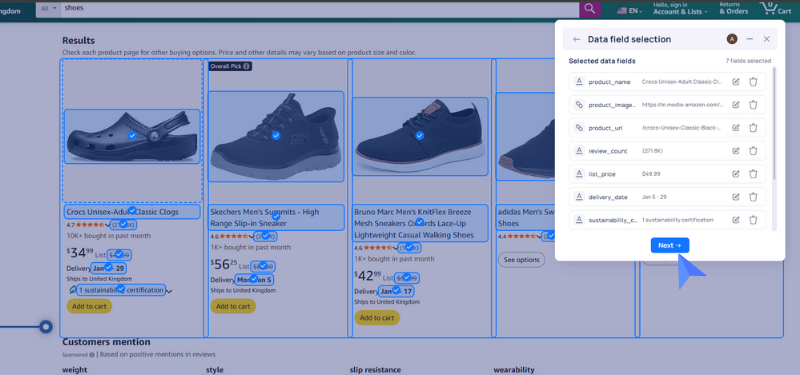
Pline uses AI to automatically detect and group similar items on the page and **preselect relevant fields**. If the grouping looks correct, click **“Yes, Looks good.”**
{% hint style="info" %}
If not, select the next group. You can **add, edit, or remove fields** as needed before proceeding.
{% endhint %}
### Step 4: Select Pagination Type
* Select the appropriate pagination type, then locate it on the page and tag it.
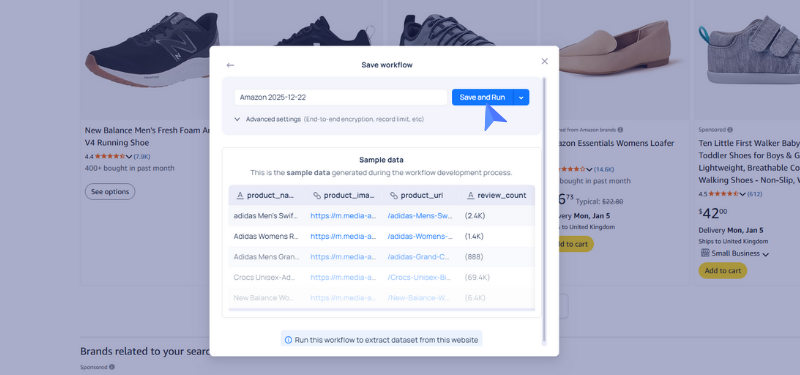
* Preview the sample data to ensure the correct items and fields are being extracted as expected.
### Step 5: Run the Workflow
Give your workflow a name and click **Save and Run.**
### **Step 6: Access and Export Your Data**
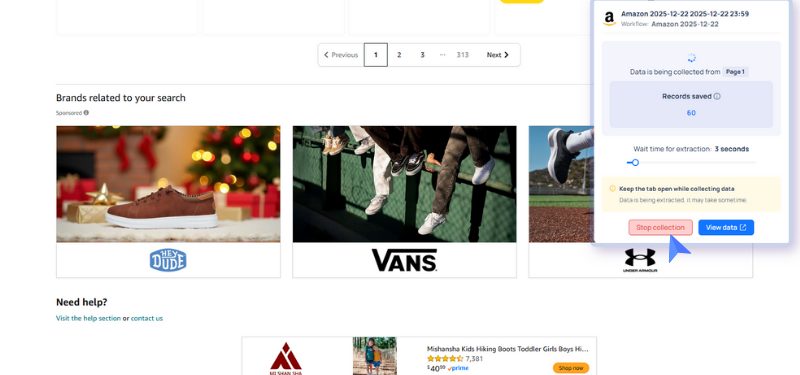
* Stop the extraction once you’re done.
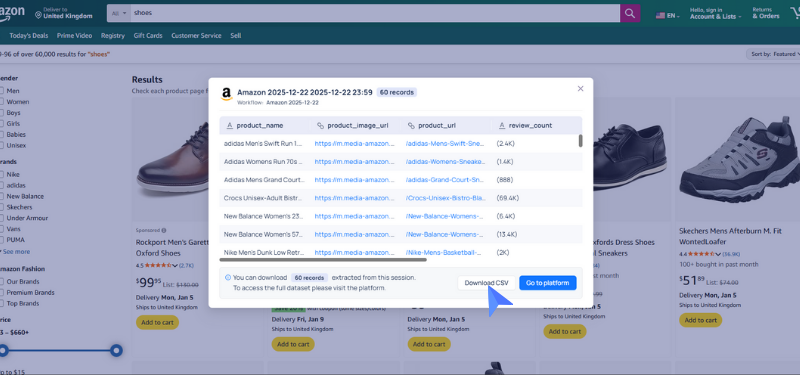
* Download your dataset in **CSV** or explore further in Pline's Platform.


.png?alt=media&token=4d000626-c437-4d41-bb77-47526afbe658)
.png?alt=media&token=6ff21cb7-a739-4aa7-99dd-6e5cebd5deef)